
本节代码对应 GitHub 分支: chapter9
# 歌词解析插件封装
在封装插件之前,我想有必要给大家看一看歌词数据的格式。
在 Player/index.js 中:
// 在组件内部编写
const currentLyric = useRef ();

useEffect (() => {
  //...
  getLyric (current.id);
  setCurrentTime (0);
  setDuration ((current.dt/ 1000) | 0);
}, [currentIndex, playList]);

const getLyric = id => {
  let lyric = "";
  getLyricRequest (id)
    .then (data => {
      console.log (data)
      lyric = data.lrc.lyric;
      if (!lyric) {
        currentLyric.current = null;
        return;
      }
    })
    .catch (() => {
      songReady.current = true;
      audioRef.current.play ();
    });
};
其中 getLyricRequest 方法封装在 api/request.js 中。
export const getLyricRequest = id => {
  return axiosInstance.get (`/lyric?id=${id}`);
};
在 Player/index.js 中引入。
目前打开播放器,点一首歌,便能在控制台看到获取到的歌词信息。
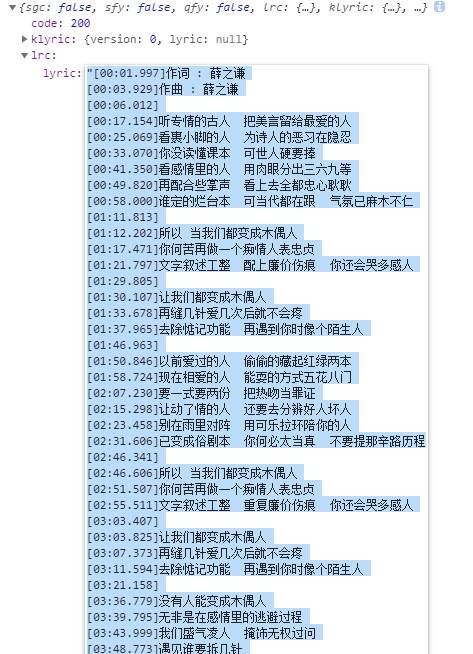
可以看到,现在能获取到的歌词信息仅仅只是一个字符串,而且格式相对规整,[] 中的内容为时间戳,紧接着的内容是歌词内容。
如果想要将歌词集成到现有的项目中,那解析歌词是必不可少的工作。
现在,就带大家来一起完成这个相对复杂的插件的封装,后期会以彩蛋的形式对它进行扩展、升级。
第一版插件代码参考了现有 github 开源仓库 https://github.com/ustbhuangyi/lyric-parser,在此深表鸣谢!
# 初始化插件
构造器传入两个参数,一个是待解析的字符串,另一个是当歌曲播放抵达某个时间戳的时候,执行相应的回调。
// 解析 [00:01.997] 这一类时间戳的正则表达式
const timeExp = /\[(\d{2,}):(\d{2})(?:\.(\d{2,3}))?]/g

const STATE_PAUSE = 0
const STATE_PLAYING = 1
export default class Lyric {
  /**
   * @params {string} lrc
   * @params {function} handler
  */
  constructor (lrc, hanlder = () => {}) {
    this.lrc = lrc;
    this.lines = [];// 这是解析后的数组,每一项包含对应的歌词和时间
    this.handler = hanlder;// 回调函数
    this.state = STATE_PAUSE;// 播放状态
    this.curLineIndex = 0;// 当前播放歌词所在的行数
    this.startStamp = 0;// 歌曲开始的时间戳

    this._initLines ();
  }

  _initLines () {
    // 解析代码
  }
}
# 解析字符串,生成 lines 数组
  _initLines () {
    // 解析代码
    const lines = this.lrc.split ('\n');
    for (let i = 0; i < lines.length; i++) {
      const line = lines [i];// 如 "[00:01.997] 作词:薛之谦"
      let result = timeExp.exec (line);
      if (!result) continue;
      const txt = line.replace (timeExp, '').trim ();// 现在把时间戳去掉,只剩下歌词文本
      if (txt) {
        if (result [3].length === 3) {
          result [3] = result [3]/10;//[00:01.997] 中匹配到的 997 就会被切成 99
        }
        this.lines.push ({
          time: result [1] * 60 * 1000 + result [2] * 1000 + (result [3] || 0) * 10,// 转化具体到毫秒的时间,result [3] * 10 可理解为 (result / 100) * 1000
          txt
        });
      }
    }
    this.lines.sort ((a, b) => {
      return a.time - b.time;
    });// 根据时间排序
  }
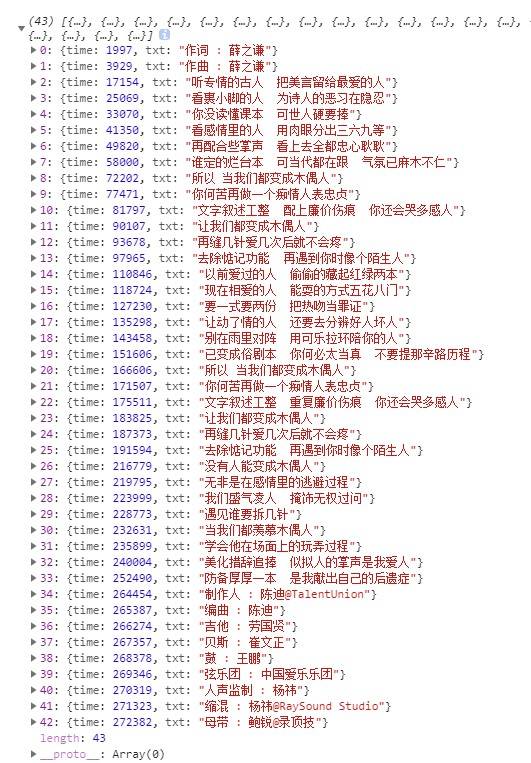
现在解析后的效果如下:
# 开始播放
对应的插件方法为 play 方法,如下所示:
//offset 为时间进度,isSeek 标志位表示用户是否手动调整进度
play (offset = 0, isSeek = false) {
  if (!this.lines.length) {
    return;
  }
  this.state = STATE_PLAYING;
  // 找到当前所在的行
  this.curLineIndex = this._findcurLineIndex (offset);
  // 现在正处于第 this.curLineIndex-1 行
  // 立即定位,方式是调用传来的回调函数,并把当前歌词信息传给它
  this._callHandler (this.curLineIndex-1);
  // 根据时间进度判断歌曲开始的时间戳
  this.startStamp = +new Date () - offset;

  if (this.curLineIndex < this.lines.length) {
    clearTimeout (this.timer);
    // 继续播放
    this._playRest (isSeek);
  }
}

_findcurLineIndex (time) {
  for (let i = 0; i < this.lines.length; i++) {
    if (time <= this.lines [i].time) {
      return i
    }
  }
  return this.lines.length - 1
}

_callHandler (i) {
  if (i < 0) {
    return
  }
  this.handler ({
    txt: this.lines [i].txt,
    lineNum: i
  })
}
# 继续播放
对应的方法为_playRest,如下所示:
//isSeek 标志位表示用户是否手动调整进度
_playRest (isSeek=false) {
  let line = this.lines [this.curLineIndex];
  let delay;
  if (isSeek) {
    delay = line.time - (+new Date () - this.startStamp);
  } else {
    // 拿到上一行的歌词开始时间,算间隔
    let preTime = this.lines [this.curLineIndex - 1] ? this.lines [this.curLineIndex - 1].time : 0;
    delay = line.time - preTime;
  }
  this.timer = setTimeout (() => {
    this._callHandler (this.curLineIndex++);
    if (this.curLineIndex < this.lines.length && this.state === STATE_PLAYING) {
      this._playRest ();
    }
  }, delay)
}
画图模拟一下 isSeek 为 true 和 false 的两种情况。
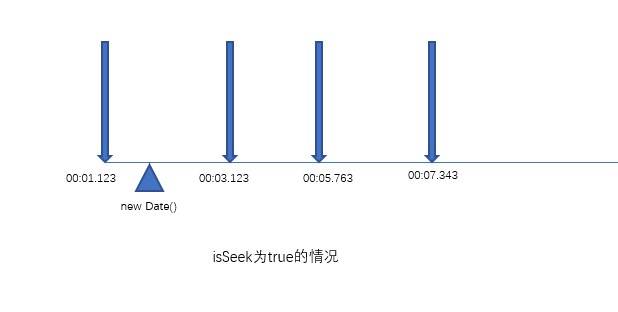
那触发下一次_playRest 就还剩 00:03.123 - (new Date () - 歌曲开始的时间戳)。即:
delay = line.time - (+new Date () - this.startStamp);
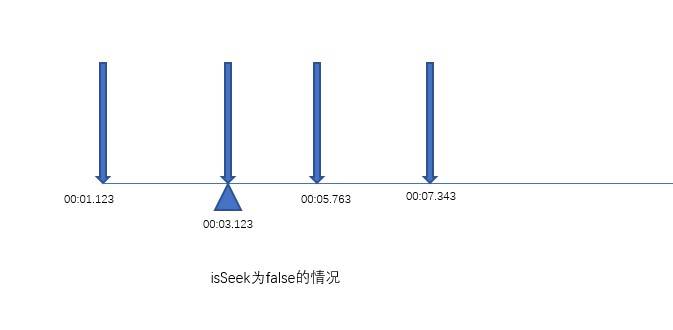
那这个时候触发下一次_playRest 就还剩 00:05.763 - 00:03:123 了。即:
// 拿到上一行的歌词开始时间,算间隔
let preTime = this.lines [this.curLineIndex - 1] ? this.lines [this.curLineIndex - 1].time : 0;
delay = line.time - preTime;
# 两个状态切换:暂停和播放
歌曲暂停 (播放) 的时候,歌词也应该相应地暂停 (播放)。
togglePlay (offset) {
  if (this.state === STATE_PLAYING) {
    this.stop ()
  } else {
    this.state = STATE_PLAYING
    this.play (offset, true)
  }
}

stop () {
  this.state = STATE_PAUSE
  clearTimeout (this.timer)
}
# 切到某个时间点播放
由于之前做了很多的铺垫,现在用户手动调整进度的时候,只需要调用 play 方法,并对 isSeek 参数传入 true 就可以了。
seek (offset) {
  this.play (offset, true)
}
OK! 歌词插件初步封装完成,接下来我们需要将它集成项目中,不要走开,精彩继续!


